Case Study
Try Surfly: Making Co-Browsing Understandable in Seconds
A self-guided demo that let visitors experience a real co-browsing session on their own website, turning a difficult product concept into something understandable in seconds.
- Technical Build
- Technical Sales
- Communication
The Problem
Co-browsing is simple once you've seen it and surprisingly awkward to explain beforehand.
A Surfly session lets multiple people interact with the same web experience while keeping separate browser views and passing control between participants.
To someone unfamiliar with the product, that can sound a lot like screen sharing.
I wanted to remove the explanation and let people experience the difference themselves.
What I Did
I built the demo around one interaction:
Enter a website → start a session → experience co-browsing.
The page shows two browser views side by side: You and Them.
The visitor navigates in one window and sees the second participant follow in the other. They can then transfer control using the normal Surfly interface.
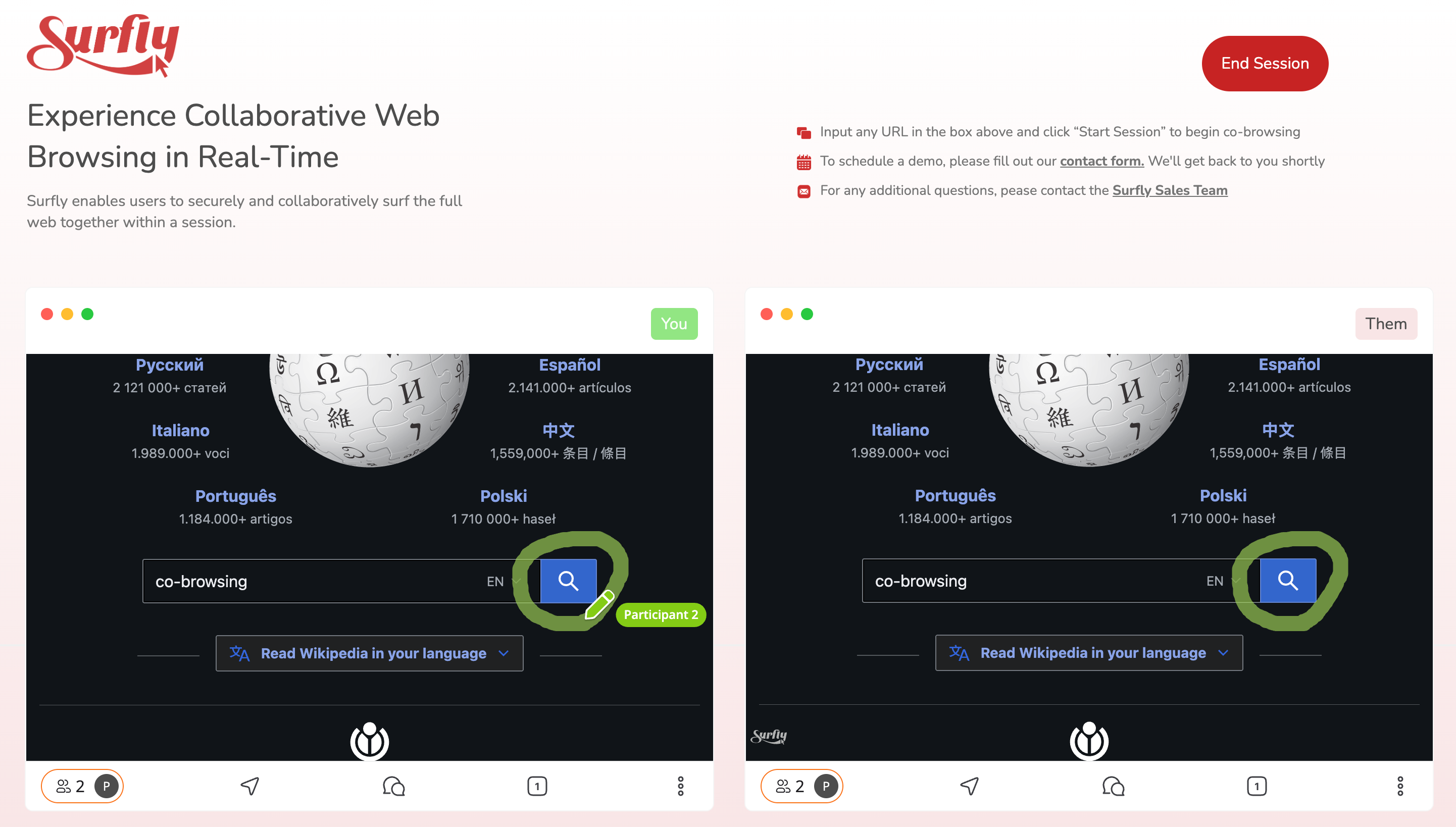
Keeping both views on the same screen was deliberate. Opening separate browsers or asking someone to resize windows would add friction to a demo whose whole purpose was to make the idea obvious quickly.
There was no download, installation or website integration. Within a few seconds, the visitor had actually used the product.
How It Worked
The demo used the real Surfly product rather than simulating it.
A dedicated Surfly instance and widget key initialised the browser-side JavaScript SDK.
When the visitor entered a valid URL, the page created a live Surfly session and embedded the controlling participant in the first frame.
When Surfly emitted the session_created event, I took the returned followerLink and loaded it into the second frame.
The result was two real participants in the same session:
Entered URL → session created → leader embedded → follower link returned → follower embedded
I also added URL validation, session start/end handling, UI state management and a dedicated demo tag for tracking usage.
Because it all ran through Surfly's normal browser experience, the visitor also learned something else without being told: they had just co-browsed their own website without installing anything or adding Surfly code to that site.
Impact
The page started on my own demo.surfly.com environment.
It became useful enough in prospect outreach and generated enough traffic that it was eventually moved onto Surfly's main website.
It stayed in use for more than two years, ran thousands of sessions and became one of the five most visited pages on surfly.com.
A guided-demo CTA on the same page also gave visitors a direct route from trying the product to speaking with Sales.
The useful part for me was that it solved the original problem without needing a better explanation.
Instead of telling someone what co-browsing was, I let them use it.