Move-Out Marketplace: Turning a Google Sheet into a live storefront
Before leaving Amsterdam, I built a lightweight marketplace that kept Google Sheets as our inventory-management interface while turning its contents into a mobile-friendly storefront we could share with one link.
- Technical Build
- Product & Market
Build stack
- Google Sheets
- Google Apps Script
- JSON API
- JavaScript
- HTML/CSS
- GitHub Pages
- Responsive UI
- AI-assisted development
Before leaving Amsterdam, we needed to sell virtually everything in our home.
Listing each item individually across marketplace sites would have created a huge amount of duplicated work, while the Google Sheet we were already using to manage everything wasn't something I wanted to send to buyers.
I built a lightweight marketplace that kept the Sheet as our management interface and turned its contents into a simple, mobile-friendly storefront we could share with one link.
Check out the live marketplaceIt's a quick & easy storefront from the Google Sheet inventory data.Opens in a new tab.The Idea
We already had the useful part: a Google Sheet containing everything we needed to sell.
The problem was distribution.
Creating and maintaining separate listings across Facebook Marketplace and similar services for an entire household would have meant duplicating the same information repeatedly. Sharing the spreadsheet directly wasn't much better — it worked well for managing stock, but badly as something people could casually browse on their phone.
I wanted to preserve the simplicity of managing everything in Sheets while putting a purpose-built interface in front of it.
What I Built
I built a lightweight marketplace for the contents of our home.
Buyers could browse items visually, filter by category, isolate free items, move through multiple photos, see prices and availability, enlarge images and contact us directly through WhatsApp.
The interface was responsive and deliberately simplified on mobile because that was how most people would open the link. On smaller screens, the layout collapses to a single-column browsing experience and removes unnecessary decorative elements.
Behind it, we continued managing everything through the same Google Sheet.
Change an item's price, category, images or sold status in the Sheet and the updated data appears to visitors the next time the page is loaded or refreshed. There is no site rebuild or redeployment.
Sold items remain visible but are automatically pushed below active listings so buyers can focus on what is still available.
The result was one URL we could send to anyone and one simple source of truth for us to maintain.
How It Works
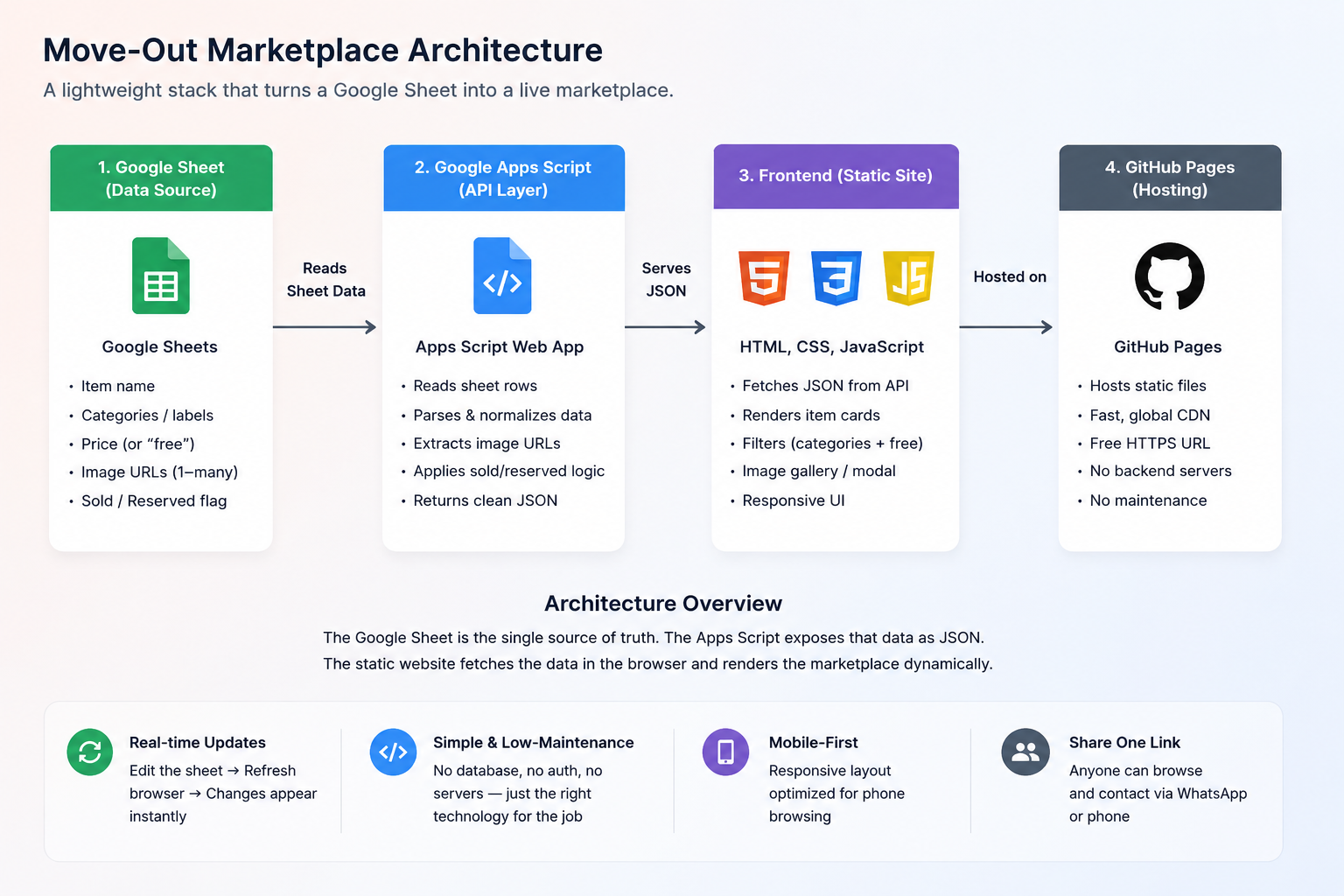
The architecture is deliberately small:
Google Sheet → Google Apps Script Web App → JSON → JavaScript frontend → browser
The Google Sheet acts as both the data store and admin interface.
A bound Google Apps Script reads the relevant worksheet using SpreadsheetApp, converts each valid row into a listing object and exposes the resulting array as JSON through a public Web App endpoint.
Before returning the data, the script performs a small amount of normalisation:
- Reads the item name, categories, price, image URLs and sold state from the Sheet
- Extracts multiple image URLs from a single cell
- Converts comma-separated categories into an array of labels
- Normalises different sold values such as
true,yes,soldor1 - Ignores incomplete rows that cannot form a usable listing
The static frontend is hosted on GitHub Pages.
When the page loads, app.js fetches the JSON endpoint and builds the marketplace entirely in the browser. It discovers the available categories from the returned data and generates the filter controls dynamically, so adding a new category in the Sheet does not require changing or redeploying the frontend.
Filtering and sorting also happen client-side. Category filters can be combined with the Free toggle, sold items are pushed below available stock, and the remaining listings are ordered by price.
Each listing card is generated from the returned data. Where an item has multiple photos, JavaScript creates a carousel and connects it to a full-screen image viewer.
The result is effectively a tiny headless content system without needing to build one:
Sheets handles management. Apps Script handles data delivery. GitHub Pages handles presentation. The browser handles interaction.
There is no custom database, authentication layer, admin application or conventional server to maintain because the use case doesn't require any of them.
How I Built It
-
I designed the project from the problem outward. The concept, architecture, UX and visual design were mine. I deliberately chose familiar, low-friction tools rather than starting with a preferred technology and forcing the problem into it.
-
Google Sheets was already where we wanted to manage the inventory, so it stayed there. Apps Script provided the smallest useful bridge between that data and the web. GitHub Pages gave me free static hosting. Image URLs could simply live alongside the listing data.
-
I used AI to write and iterate on the HTML, CSS, JavaScript and Apps Script implementation. I did not use AI to determine the concept, architecture or interface.
-
Most of the engineering difficulty had been designed out before I started coding. That was intentional. This wasn't an exercise in demonstrating the most complicated stack I could build. It was applying familiar web concepts to a real problem and choosing the least complicated architecture capable of solving it properly.
-
Once we'd finished using it ourselves, I generalised the code and documentation so someone else could connect their own Google Sheet and deploy the same system with minimal effort.
Experience / Evidence
The Marketplace
Features include:
- Responsive desktop and mobile layouts
- Categories generated dynamically from Sheet data
- Combined category and free-item filtering
- Multiple-image carousels
- Full-screen image previews
- Flexible price and availability presentation
- Structured sold-state handling and automatic prioritisation of available inventory
- Direct WhatsApp contact
- Sheet-driven updates without rebuilding or redeploying the site
What I Learned
The best technical solution is not necessarily the one with the most technology in it.
We could have built a database, an admin portal, authentication, a CMS and a conventional application backend. None of those things would have made our problem easier.
Google Sheets was already an excellent management interface. What was missing was a better experience on top of it.
A lot of technical judgement is knowing what not to build.
Solve the problem. Use the simplest tools that solve it properly. Stop when the problem is solved.